What is YARA?
YARA is a recursive acronym that stands for “Yet Another Recursive Acronym”. It is a open-source rule-based pattern matching tool that allows security professionals to create custom rules for identifying and categorizing malware and other threats based on textual or binary patters.
Why YARA?
What makes YARA stand out is, the ability to create custom rules tailored to the specific needs of an organization or researcher. Some key reasons for using YARA include:
Flexibility: YARA’s flexible rule-based approach allows users to define custom rules that target specific malware families or characteristics. This adaptability ensures that YARA can address a wide range of threats.
Efficiency: By leveraging pattern matching, YARA can quickly scan large datasets of files, memory, or network traffic, helping to identify potential threats promptly.
Customization: Security professionals can create YARA rules based on their knowledge of the environment and unique security requirements, offering a personalized approach to threat detection.
Community and Sharing: YARA rules can be shared and updated within the cybersecurity community, promoting collaboration and empowering collective defense against cyber threats.
YARA installation
Latest releases of Yara can be found at : https://github.com/virustotal/yara/releases
Installing the Dependencies
1
sudo apt-get install automake libtool make gcc pkg-config flex bison
Building and Installing
1
2
3
4
5
6
7
8
wget https://github.com/VirusTotal/yara/archive/refs/tags/v4.3.2.tar.gz
tar -zxf v4.3.2.tar.gz
cd yara-4.3.2
./bootstrap.sh
./configure --with-crypto --enable-profiling --enable-macho --enable-dex --enable-cuckoo --enable-magic --enable-dotnet
make
sudo make install
sudo apt-get remove -y libyara9 python3-yara #Removes any existing installation from distro repos
Verify YARA installation :
After installation, you can verify that YARA is working correctly by running the following command in the terminal:
1
yara --version
This command will display the version of YARA installed on your system, confirming that the installation was successful.
Yara Syntax
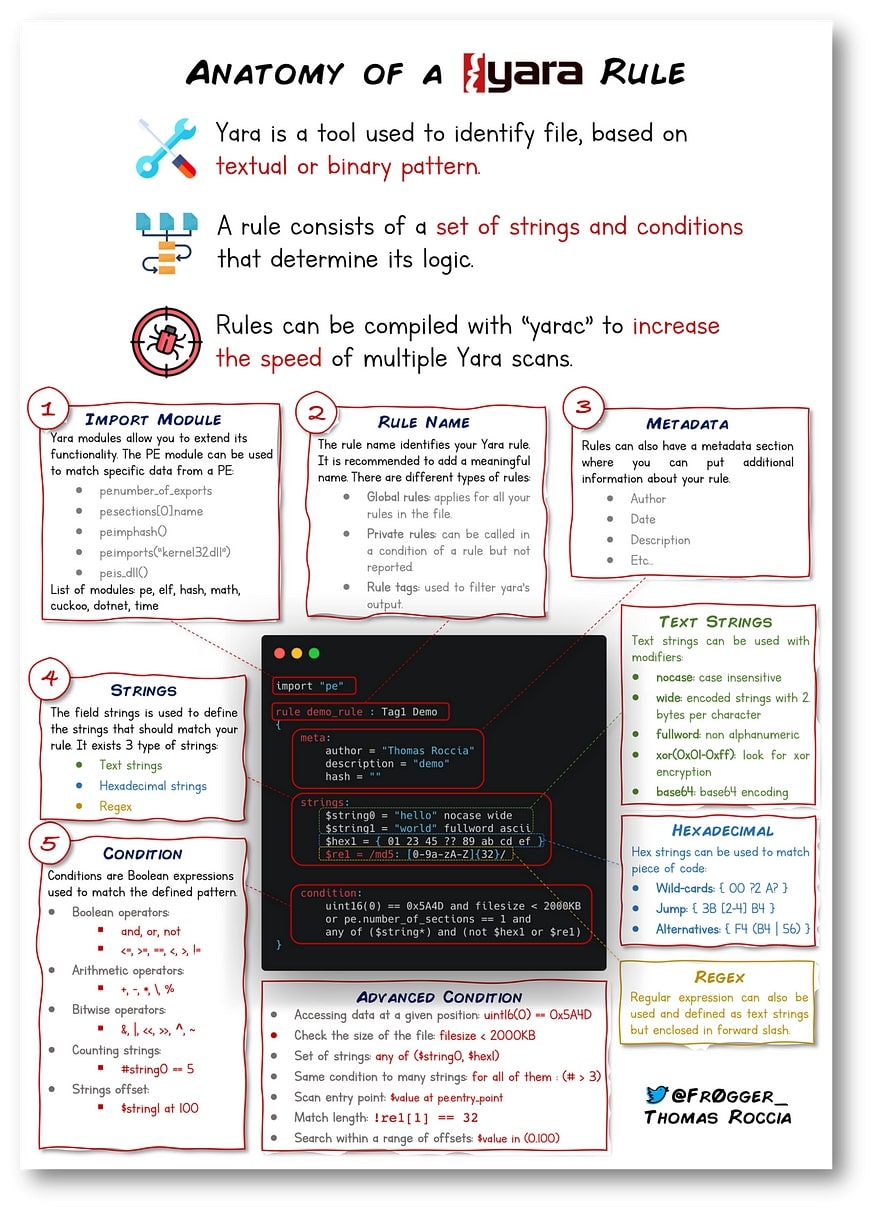
YARA rules are written in files with the .yar extension. Each YARA rule is composed of several sections, enabling a structured and organized approach to defining detection patterns.
Import Module :
- To enhance the functionality of YARA rules, you can import other external YARA modules. These modules provide additional features and capabilities for your rules. For example, importing the “pe” module allows you to analyze Windows PE files more effectively:
1
import pe
Rule name
- A YARA rule must have a user-defined name that helps organize the rules within a ruleset. Giving meaningful names to rules is essential for easy identification and management. For instance:
1
rule my_first_rule
Meta Data :
- Adding meta data to your YARA rule can be incredibly valuable, especially when sharing your rules with the community or your colleagues. Meta data provides additional information about the rule’s purpose, author, and description. It aids in better understanding the rule’s intent and usage. Here’s how you can include meta data in your rule:
1
2
3
4
meta:
  author = "Karan"
  description = "My First yara rule"
  date = "2023-07-27"
Strings :
Strings are the heart of a YARA rule and define the patterns you want to search for in a file. YARA supports various types of strings, including plain text strings, hexadecimal strings, and regular expressions.
- Plain Text Strings: These strings are enclosed in double quotes and can be used to search for specific text patterns in files:
- Hexadecimal Strings: Hex strings allow you to search for binary patterns in files. You can use wildcards (represented by “?”) to match variable bytes.
- Regaular expression: YARA supports regular expressions to create more flexible and complex pattern-matching rules. . For instance, you can use a regular expression to search for MD5 hashes.
1
2
3
4
strings:
  $text_string = "text here"
  $hex_string = { E2 34 ?? C8 A? FB }
  $re1 = /md5: [0-9a-fA-F]{32}/
Condition :
The condition part of a YARA rule is crucial, as it determines when the rule will be triggered based on the presence or absence of specific strings or characteristics in the target file. Understanding various ways to craft conditions enhances your ability to create effective and precise YARA rules. Below are the some of the ways the conditions can be written.
- Boolean Logic: Boolean logic allows you to combine multiple conditions using operators like
AND (and),OR (or), andNOT (not). For example:1 2
condition: $hex_string and $text_string
The rule will match if both the
$hex_stringand$text_stringare found in the file. - Using Quantifiers : Quantifiers enable you to specify how many times a string or condition should be repeated in the file. YARA supports quantifiers like
at least,at most, andany of them. For example:1 2
condition: $string1 at least 2 and $string2 at most 4
The rule will match if
string1is found at least twice andstring2is found at most four times in the file. - File size Condition : YARA allows you to incorporate file attributes into conditions. You can use the special attribute
$filesizeto create conditions based on the size of the file. For example:1 2
condition: $filesize < 5MB
- Combining Multiple Conditions: Leveraging the power of boolean logic, quantifiers, and file attributes, you can create comprehensive conditions tailored to your specific use case. For example:
1
2
condition:
	$filesize < 2MB and ($string1 or $string2) and not $string3
This rule will match if the file size is less than 2 MB , either string1 or string2 is found, but string3 is not found in the file.
YARA Scanning
To execute YARA rules and perform scanning, you can use the yara command-line tool. The basic command syntax is as follows:
1
yara [options] <rule_file> <target>
Example YARA rule
Rule to Detect Common Windows File Paths
1
2
3
4
5
6
7
8
9
10
11
12
13
14
15
16
17
// Rule to detect common Windows file paths
import "pe"

rule detect_common_windows_file_paths {
    meta:
        author = "Karan"
        last_updated = "2023-07-27"
        confidence = "medium"
        description = "Detects common Windows file paths in PE files"

    strings:
        $windows_paths = /C:\\(Windows|Program Files|System32|Users\\Public)\\/i

    condition:
        pe.number_of_sections >= 2 and any of them
}
In this YARA rule, we use the pe module to analyze Portable Executable (PE) files and detect common Windows file paths. The rule looks for strings that match typical Windows file paths, such as C:\Windows, C:\Program Files, C:\System32, and C:\Users\Public, regardless of the case. If any of these paths are found within the PE file, the rule will trigger. The condition also ensures that the PE file has at least two sections to increase the accuracy of the detection.
Expanding the Capabilities of YARA Rules
When crafting YARA rules, incorporating wildcards and jumps can significantly expand the rule’s detection capabilities, making it more flexible and versatile. These powerful features allow you to create rules that match a broader range of patterns, thus enhancing your threat hunting and malware detection capabilities.
WILD-CARDS
In YARA, wild cards allow you to specify flexible matching patterns for bytes or nibbles in a hexadecimal string. We can use the question mark (?) as a wild card, and the tilde (~) as the not operator Example 1:
1
2
        $hex_string1 = { F4 23 ~00 62 B4 }
        $hex_string2 = { F4 23 ~?0 62 B4 }
In the example above, in $hex_string1 we have a byte prefixed with a tilde (~), which is the not operator. This defines that the byte in that location can take any value except the value specified. In this case the first string will only match if the byte is not 00. The not operator can also be used with nibble-wise wild-cards, so the second string $hex_string2 will only match if the second nibble is not zero.
Example 2:
1
$hex_string3 = { F4 23 ( 62 B4 | 56 | 45 ?? 67 ) 45 }
YARA rule employs wild cards for flexible matching. It matches files if the string contains the specified fixed bytes F4 23 at the beginning, followed by either 62 B4 or 56 or any two nibbles between 45 and 67, and finally, ends with 45. Any other combination of bytes at these positions will not result in a match.
JUMP
Jumps, represented by [min-max], enable matching variable-length sequences between defined patterns. For example:
1
`$hex_string = { F4 23 [4-6] 62 B4 }`
This rule will match if any sequence of 4 to 6 bytes occurs between F423 and 62B4. Jumps offer flexibility, allowing different patterns within the specified range. Any of the following strings will match the pattern:
1
2
3
F4 23 01 02 03 04 62 B4
F4 23 00 00 00 00 00 62 B4
F4 23 15 82 A3 04 45 22 62 B4
YARA Rule Generators and Tools for Effective Threat Hunting
In addition to crafting YARA rules manually, there are several tools available that can streamline the process and enhance the efficiency of threat hunting and malware detection. Here are a few notable ones:
YARGEN: A powerful YARA rule generator that automates rule creation by analyzing known malware patterns, enabling quick responses to emerging threats and saving time for security analysts.
LOKI: An open-source scanner equipped with pre-built YARA rules, capable of detecting indicators of compromise (IOCs) on systems, helping security professionals swiftly identify potential threats and respond to security incidents.
THOR: A comprehensive cybersecurity tool featuring YARA-based scanning that thoroughly checks files, memory, and network traffic, utilizing YARA’s pattern-matching capabilities to uncover hidden malware and enhance proactive threat hunting.
Valhalla: An advanced YARA rule management platform that centralizes rule storage, versioning, and sharing, streamlining collaboration between security analysts and ensuring efficient rule deployment across an organization’s security infrastructure.
Cheat Sheet